Colorful Canvas Playtime
Reviews
Colorful Canvas Playtime succeeds by keeping things simple. The browser-based design means no setup, and the absence of timers or scores creates a genuinely relaxed experience. The undo and reset features give children control over their work, while the large buttons make navigation easy for small hands. It is a safe, free, and effective tool for encouraging creative play and color recognition in young children.
Description
Simple Setup, Instant Access
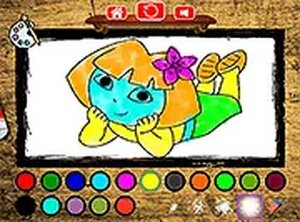
Colorful Canvas Playtime runs directly in a web browser, so there is no software installation or account creation required. Children can open the activity on a computer, tablet, or smartphone and start coloring within seconds. The interface uses large, clearly labeled buttons that are easy for small fingers to tap or click. A full-screen mode removes on-screen clutter, helping young users focus on their artwork without distractions.
Choosing and Filling Pictures
A gallery of simple outlines is presented at the start. Each image features bold lines and distinct sections, making it easy for children to see where to apply color. After selecting a picture, a palette of colors appears on the side of the screen. Tapping or clicking a color selects it, and then tapping a section of the drawing fills that area with the chosen hue. Changing colors is a quick tap away, encouraging experimentation with different combinations.
Undo and Reset Options
Mistakes are part of the learning process, and the game handles them gracefully. An undo button reverses the most recent action, allowing children to correct errors without frustration. If a child wants to start a picture over, a reset option clears all colors and returns the image to its original blank state. These tools give young users control over their creative process and build confidence in their choices.
Designed for Relaxed Play
There are no timers, scores, or levels in Colorful Canvas Playtime. The absence of competitive elements means children can work at their own pace, taking as much time as they like on each picture. This relaxed environment supports quiet, focused play at home or in a classroom setting. Parents and teachers can use the activity as a calm transition between more structured tasks.
Device Compatibility and Safety
The game is compatible with desktop computers, laptops, tablets, and smartphones, offering flexibility in where and how it is used. It is free to play and contains no in-app purchases or third-party advertisements. No personal information is collected, and no registration is required, ensuring a safe experience for young users. The focus remains entirely on the creative activity itself.








Comments
Sign in to comment
You must be logged in before posting a review or rating.
No account? Create one
No comments yet. Be the first to comment!